Kitchen POS: one menu database for web, Square, and delivery
Every restaurant that tries to be everywhere runs into the same problem: menu drift. Your website has one menu, your Square has another, your delivery apps have a third, and every time you change a price or drop an item, you're updating four places at once. One of these days, you forget something. The website is still showing last week's lunch special that's gone from the kitchen, your delivery app shows an item that costs two dollars too much, and a customer shows up expecting what they saw on Square. It's the kind of administrative chaos that sounds small until it actually damages your brand.
That problem is exactly why we built a single menu database. But we didn't set out to build a complete POS — we set out to solve one specific operational problem: the menu must be the same everywhere, and it must update everywhere the instant it changes anywhere.
The Menu Drift Problem
Here's the problem we kept running into with restaurant clients. A menu is a database of items with prices, descriptions, and categories. Those items should appear in three places at minimum:
Your website displays the menu to people ordering online. Your Square POS terminal uses the same items at the counter. The delivery apps — DoorDash, Uber Eats, your own delivery setup — are getting these items through manual uploads, API integrations, or just copy-paste.
The moment you change a price, you're updating three or four different places. That takes time, and each update is done manually by a person who has other jobs. One of these days, an old price stays somewhere, and someone orders something that costs your restaurant money. Or you drop an item from your menu and somehow it stays live on one delivery platform and you get an order you can't fulfill.
This isn't a technology problem — it's an operational problem. Every restaurant that tries to scale beyond a menu in a Word document faces this. The tool is simple, but the coordination is impossible. One change needs to immediately reflect everywhere, and no one should have to remember where all the copies live.
How Kitchen POS Started
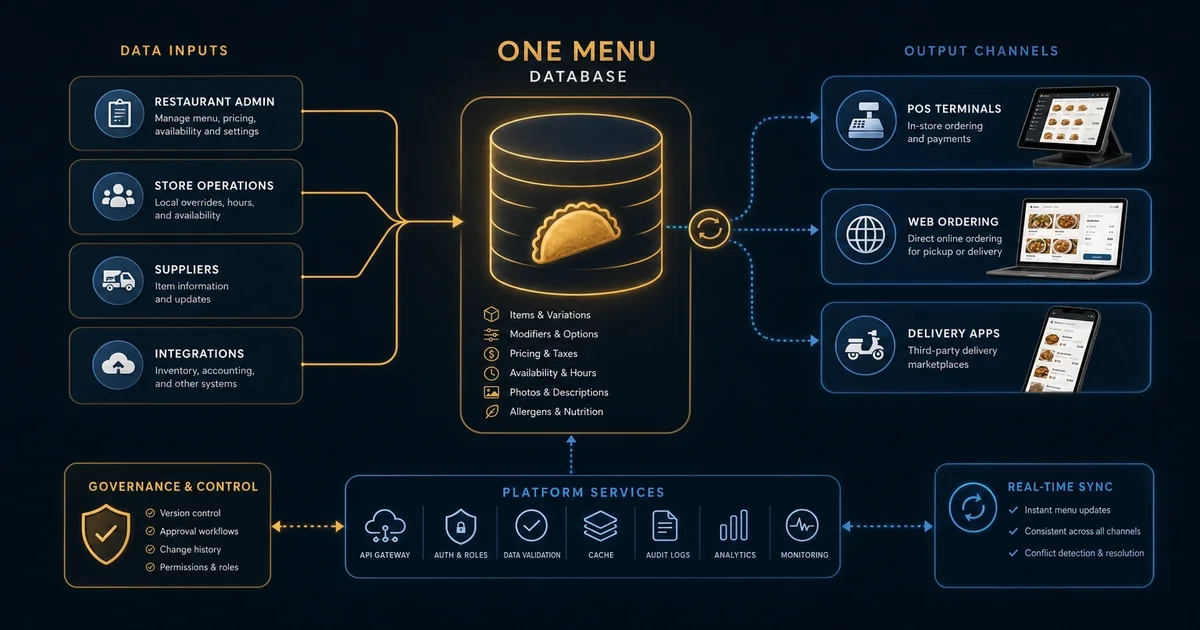
We built Kitchen POS because we needed it ourselves. Not as a full point-of-sale, just as the single source of truth for menu data that we could push everywhere. The web menu is read-only from Central Kitchen. Square pulls from the same database. The delivery apps pull from the same source. When we change something in Central Kitchen, it's reflected everywhere within seconds.
We didn't start by building a POS. We started by building a menu database that everything else connects to:
A web interface for creating and managing menu items. This is where we add items and change prices. It's in the same system as everything else.
An API that publishes menu data to external services — Square's catalog API, API integrations with delivery platforms, and the web menu display. The API is read-optimized and can answer very fast so the web menu loads instantly. That's the one-way flow from the source of truth to the world.
We don't handle orders. That's a separate system — we simply make it easy to embed a menu anywhere. Any order that happens from that menu flows back to whichever point-of-sale system you're using (Square or something else).
That last choice is deliberate. We're not trying to build the full transaction flow. We're only trying to manage what menu shows where. When an order happens, it goes to your POS like always.
Architecture at a Glance
Everything sits in a single SQLite database (kitchen-pos.db) on the Kitchen POS host — the same file powers the admin UI, REST API, and channel sync jobs. Core tables include menu_items (SKUs, prices, availability), categories, locations, and order tables. One row in menu_items is the source of truth for what empanadaempire.us, Square, and delivery channels show after sync. That data is exposed through an API consumed by:
Your web menu. We pre-render into static HTML and cache it for speed. When anyone requests a web menu page, we've already fetched the latest data.
Square. We push catalog updates daily (that's configurable per location) and set the items up in the Square catalog. That keeps them almost in sync — if you make a change in Kitchen POS, it'll reflect in Square by the next sync.
Delivery apps. Same pattern: we push catalog data to each service when they've changed. Some are daily full replaces; others take incremental updates; all of them are configured per your integration.
The architecture is simple because it has to be. The database is a source of truth, and we've built an API that normalizes the data the way each system needs it. Each integration reads on its own schedule, the data never needs manual reconciliation, and you change it in one place and it's everywhere.
Why Square Integration Matters
We use Square as our primary POS because it's popular and reasonably priced. It has a catalog API that lets you manage items remotely, and that's exactly what we need. The Kitchen POS updates push to Square, the POS reflects those changes when someone rings an item up, and all the sales data lives in one system.
That means a few important things we keep in mind:
We're only pushing to Square's catalog side — not pulling orders or handling the payment side of any transaction. That keeps the integration simple and lets us focus on keeping menus consistent. We're not trying to rebuild Square.
When Square is updated, their item codes can differ from ours. We maintain a mapping that maps our IDs to those you get back from Square. This is how we track what item was ordered without creating duplicates. That's something that needs care for any platform you sync with.
The full integration would have been even simpler than we expected because the Square catalog API was straightforward.
What the Web Delivery System Gets
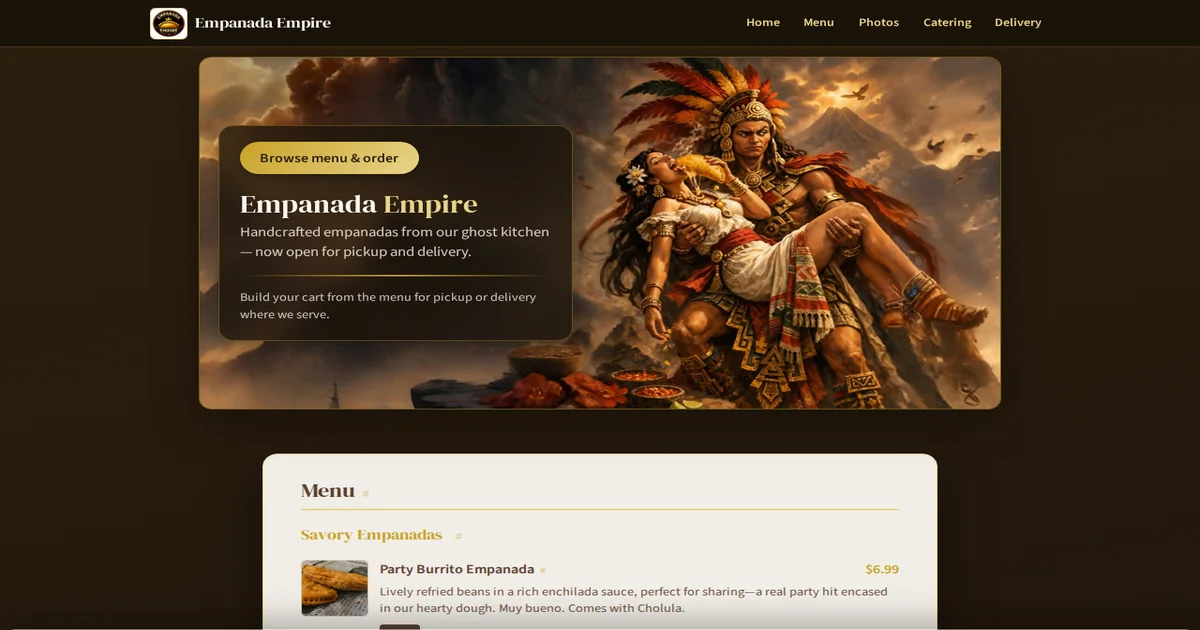
Most of their web ordering came from two places: embedded menus on the restaurant's website and direct menu links. Those are both read-only views — we push to a lightweight web application, it handles the display, and that page serves as the web menu. No WordPress, no database. When you check the website, it's a JSON feed being rendered into static HTML. That's exactly how it should work.
The web view gets modified by our CSS library. We're not rebuilding from scratch — we built a thin styling layer that makes every menu look consistent for each restaurant. That's the same CSS that makes each outlet look distinct. It means we can make wholesale updates across all of our menus by adjusting one stylesheet that gets rebuilt to each one.
Limits
Here's what we deliberately didn't build:
We don't handle orders, payments, tips, or any transaction flow — that's what Square is for. We don't do inventory, supply ordering, or anything to do with counting inventory behind the bar. We don't manage staff schedules, employee management, schedule-based menu rotation, or workforce planning.
For what we built, some things are easier. The menu updates propagate everywhere in seconds. The web menu is pre-rendered and fast. Running everything through Square saves a ton of work.
Some things are harder. We can't provide real-time sync with any delivery provider — they each need their own integration and each has their own API. Menu management is one-way from Central Kitchen to everything else. If your data changes in Square itself (not through us), we can't automatically sync that direction.
That's where the tradeoff makes sense for everyone. We're not trying to rebuild what Square already does, but we need a menu that's the same everywhere at once. What we built does one thing and does it very well.
Close
Kitchen POS is a simple tool for restaurants who need one database that updates everywhere. It works with what you already have: your Square POS for orders, your website for menus, every delivery app. That's all it does, and that's how we built it.
We run this in production every day. If you want the same capability for your program, or help turning ops data into a clear decision, get in touch.